Good to know
Why a signature upload is harder than it looks
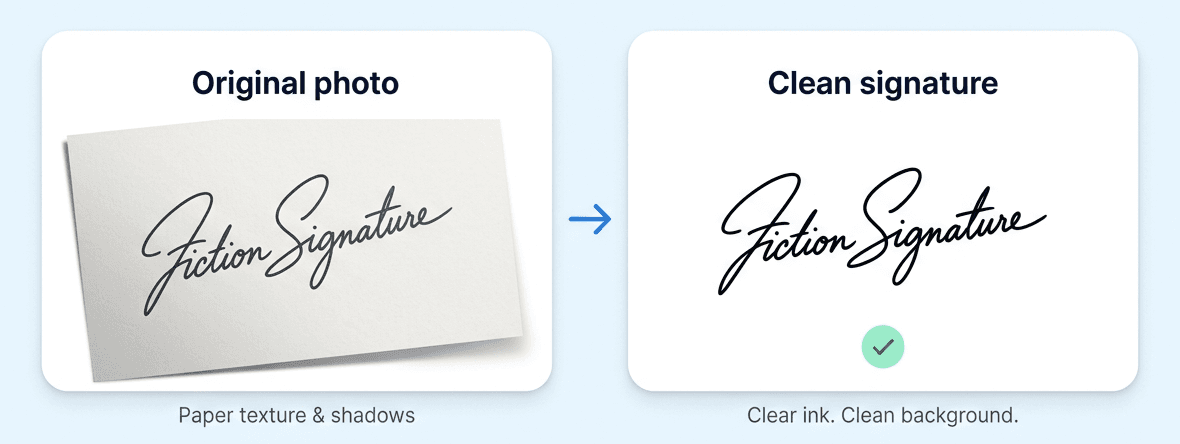
A phone photo of a signature is a colour image several thousand pixels wide, with paper texture, a slight shadow gradient and grey anti-aliased edges around the ink. A form asking for 140 by 60 pixels under 20 KB expects something closer to a scanned line drawing. Simply resizing the photo produces a grey, smudged rectangle that many portals reject as unclear.
The step people miss is thresholding: deciding, per pixel, whether it is ink or paper. That removes the paper texture and shadow gradient entirely and leaves solid dark strokes on clean white, which survives being scaled down to a tiny size.
Getting the threshold right
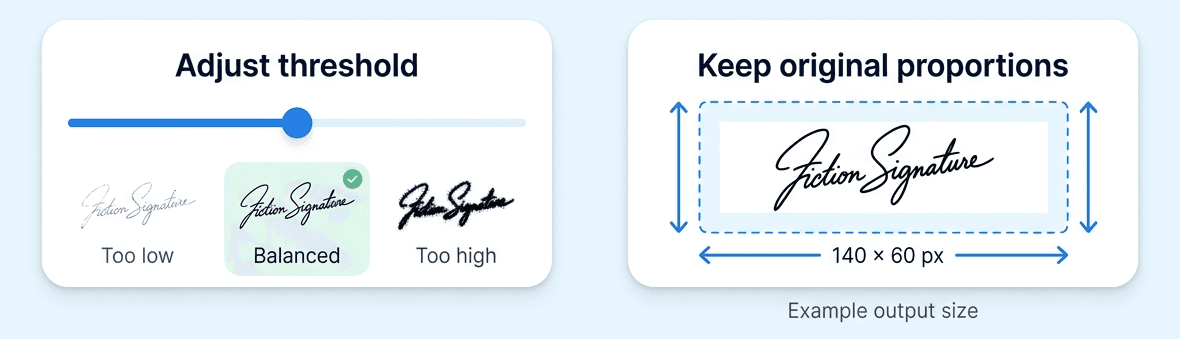
There is no universal value, because it depends on your pen, your paper and your lighting. Start at the default and watch the preview. If the strokes look broken or dotted, the threshold is too low and genuine ink is being treated as paper, so raise it. If you see grey speckle or a dark band along one edge, the threshold is too high and shadow is being treated as ink, so lower it.
Aspect ratio is preserved
Signatures are wide and short, and the target boxes are too, but rarely at exactly the same ratio. Rather than stretching your signature to fill the box, which would distort it, the image is scaled to fit inside and centred. That keeps the signature looking like your signature while still producing a file at the exact pixel dimensions required.
Practical tips
Sign larger than usual, since scaling down forgives a lot but scaling up forgives nothing. Use a pen with a reasonably thick stroke, because a fine ballpoint can vanish at 140 pixels wide. And photograph in daylight near a window rather than under a ceiling light, which throws a shadow from your phone across the paper.